
From Software’s SoulsBorne games have the distinct capacity to be amazing experiences both in terms of single-player and multiplayer wise. The games have the tendency of captivating a player’s mind and curiosity while they are alone exploring the beautifully desolate worlds From Software tends to create, all the while being a totally different experience when you are helping your buddies out exploring the same world together.
The online experience provides a type of hand-holding where you and your partner will share the weight of the hardship that this game will inevitably put you through. There are opportunities where one could ask for help in navigating the brutal enemies and bosses in the game while on the flip side the challenge of PVP will spark the competitive side in you.


Elden Ring follows the same formula as previous games in terms of online where you can spot ghosts of other players roaming the same areas as you and the messages left on the ground that will cryptically either help you or plunge you to your death. There is a lot of fun to be had if you indulge in this online play.
Related: 5 Reasons Why You Should Duplicates Ashes of War In Elden Ring
To play Elden Ring in Offline mode go inside the Network tab of the Settings and change the Launch Settings to Play Offline. This will disable all online features from the start of the game.
Online Mode Features in Elden Ring
While the game is in online mode you will be able to do the following things:
- Messaging: The trademark From software restricted way you could leave a message marker on the ground for other players to see in their game/world and also you could read others’ messages in yours.
- Co-op: Asking and summoning other random people’s help or creating a party with your friends to play the game together.
- PVP: Other players’ invasions in your world or yours in their world to battle out whose the better Elden Lord.
- Death Marks: The red markers on the ground that when you interact with will show you a glimpse of how a player died in that spot.
- Player Ghosts: You will constantly be spotting white ghosts of other players that are in the same spot as you in the their respective game/world.
Going in offline mode will disable all these features and you will be left alone to explore the world as you please without much outside interference.
Related: Both Eternal Cities Locations In Elden Ring
Putting Elden Ring In Offline Mode
Elden Ring will by default try to put you in an online mode whenever you start the game and to turn this option off you need to go to the Pause menu or from the Start menu and go to System>Network, and then look for Launch Setting. Change it from Play Online to Play Offline. This way you can have a completely single-player experience.
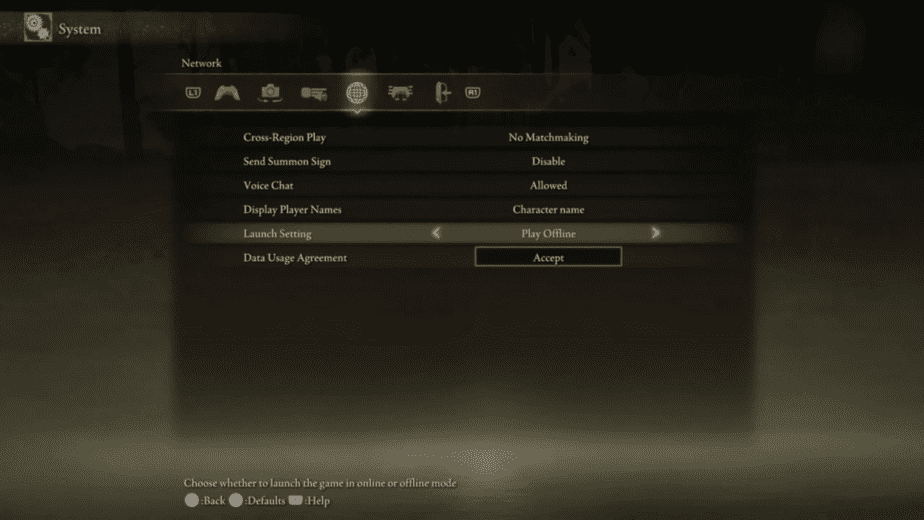
Doing so will remove all online features of the game to make it truly single player.
Offline mode has its benefits as you won’t be constantly given all the online information this game provides and the small chances of spoilers will be easily ignored. The game stands strong as a single-player experience too and one that I personally really enjoy without outside annoyance.