
Borderlands is the genre-defining looter shooter that cemented this particular genre in the annals of history. From its millions of guns gimmick to its robust RPG mechanics perfect for players who love experimenting with various builds this game series has provided countless hours of enjoyment for the FPS enthusiast, not to mention their over-the-top wacky humor has kept it distinct amongst the sea of dreary shooters.
All this craziness can be faced with a group of friends as Borderlands has always kept this cooperation as a core gameplay feature. But what if you are a single-player person and like to experience games alone or you are tired of the constantly broken hotfixes and nerfs that Gearbox is pushing over you and are looking for ways to play Borderlands 3 offline, we have you covered right here so read along.
The answer to whether you can play Borderlands 3 offline is Yes you can play it.

Related: The Best Way to Level Up Solo in Borderlands 3
Can You Play Borderlands 3 Offline?
Depending on your platform/console of choice, going offline is buried under some settings and below we will help you navigate through these settings to ge to “Offline Modes”.
For PC :
Borderlands is now available on both Steam and Epic Games Store and to play the game offline you need to use the respective launcher to access this feature. Both ways are instructed below:
On Steam :
- Launch Steam on your PC and do keep in mind to update your copy of Borderlands 3 as it is necessary that the game is updated to play in offline mode.
- Go to the toolbar at the top of the Steam main screen and select the “Steam” button/option.
- From the drop-down window select the “Go Offline” option.
- A new window will pop up asking you to restart steam so select RESTART IN OFFLINE MODE option.
- Once Steam restarts it will now be in Offline Mode and you can simply start Borderlands 3 and you will be offline.
Related: When to Start True Vault Hunter Mode in Borderlands 3
On Epic Games :

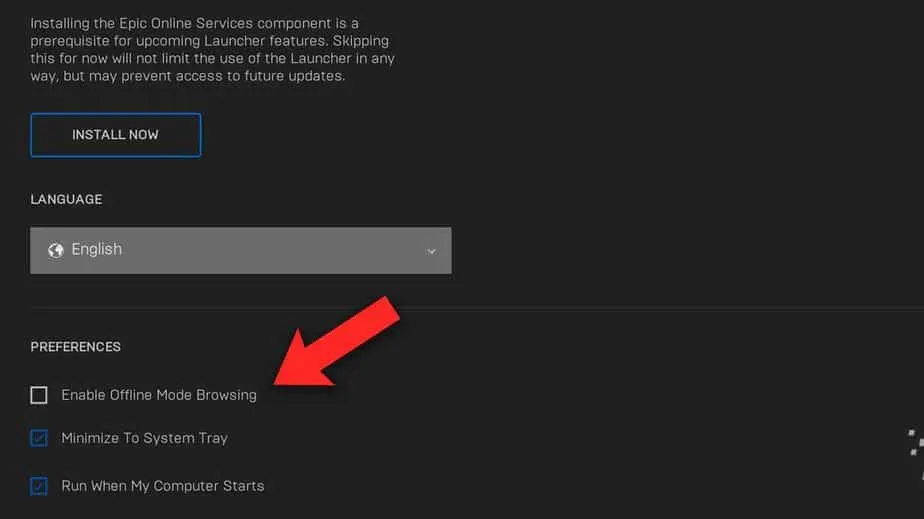
- Start Epic Games Launcher and be sure to update your Borderlands 3 copy for the offline effect to work.
- Go to the top right corner of the screen/launcher and click on your profile icon.
- From the drop-down menu select the Settings option.
- From within the Settings locate the Preferences section and tick/check the “Enable Offline Mode Browsing” option.
- With this option enabled you can play Borderlands 3 offline.
Related: When Should You Start the Borderlands 3 DLC
For Console (PS4 and Xbox) :
You can simply launch the game without an internet connection to play offline. Otherwise, you can also disable the internet within the game’s settings. In order to do this, follow the steps below:
- First and foremost, you have to disconnect your console from your internet connection.
- Next up, launch the game and go to the game’s Settings.
- Under the Settings, go to the Network section and find the “Connect to the Internet” option.
- You have to then untick the “Connect to the Internet” option.
- Finally, you can play the game in offline mode.
Though it is quite easy to play Borderlands 3 offline you must be aware that certain aspects of the game will not be accessible in this mode and are specifically designed to be played online. With that said have fun enjoying your game alone and free from annoying players online.